Google Drive/File Stream

“Disabled” account issue

On the morning of Friday, September 10, LITS received numerous reports of certain student accounts being disabled. Printing, WiFi, email, Google Workspace, Canvas, Self Service, and other Allegheny College services were affected by this outage.

We believe that the issue has been resolved. If any students are still receiving this error message, please alert the InfoDesk at 814-332-3768, or stop by the InfoDesk so we can help troubleshoot.
Google Outage

Google reported an outage of most Google Workspace services, including Gmail, Meet, and Drive, as of 7:30 a.m. EST Monday, December 14th.

Service has been restored for most users, and Google reports that they “expect a resolution for all users in the near future.”

If you are experiencing issues with any Google product, please be aware that LITS is monitoring the situation and will provide updates as they are available.

UPDATE: At about 8 p.m. EST on Monday, December 14th, 2020, Google reported that the issues with Google Workspace services appear to have been resolved.

If you encounter any issues with Google Workspace, please reach out to the InfoDesk via email, call us at 814-332-3768, or open a Web Help Desk ticket.

Service Disruption: Google Drive

LITS is aware of an issue with Google Drive for some users. Google reports that the affected users are able to access Google Drive, but are seeing error messages, high latency, and/or other unexpected behavior.

UPDATE from Google:

“The problem with Google Drive should be resolved. We apologize for the inconvenience and thank you for your patience and continued support. Please rest assured that system reliability is a top priority at Google, and we are making continuous improvements to make our systems better.”

LITS will monitor the situation and update this post if we learn more from Google.


Want to receive news and updates from LITS in your email? Manage your email subscriptions.

Scheduled Network Outage

Beginning at 3 a.m. on Thursday, September 5, LITS will be conducting scheduled maintenance on the Allegheny College network infrastructure. Work is expected to be completed by 6 a.m.

During this maintenance, internet services across campus will frequently be unavailable for extended periods. This will affect both wired and wireless networks. Most campus phone systems will also be unavailable during these interruptions.

We appreciate the patience and understanding of the campus community during this necessary maintenance.

Google Network Congestion Issue resolved

Google is reporting that the network congestion issue in the eastern USA affecting Google Cloud, G Suite, and YouTube has been resolved for all affected users as of 7:00pm EDT.

Widespread Google Outages

Google is confirming widespread outages across most of its services starting at roughly 3-3:30pm EDT, related to high levels of network congestion in the eastern US.  For more information about the outage, please visit Google’s System Status page here:

https://status.cloud.google.com

or read this summary link on CNet:

https://www.cnet.com/news/google-cloud-issues-take-down-youtube-snapchat-gmail-and-more/

Allegheny’s internet connectivity is functioning normally.

Google Drive File Stream on Mac OSX

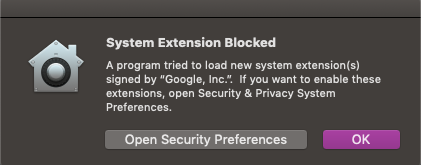
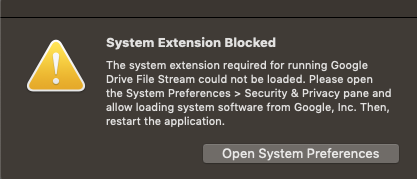
Due to a recent update to Google Drive File Stream, Mac OS users may see the following error messages when trying to open the application:

Perform the following steps in order to allow Google Drive File Stream to work properly:

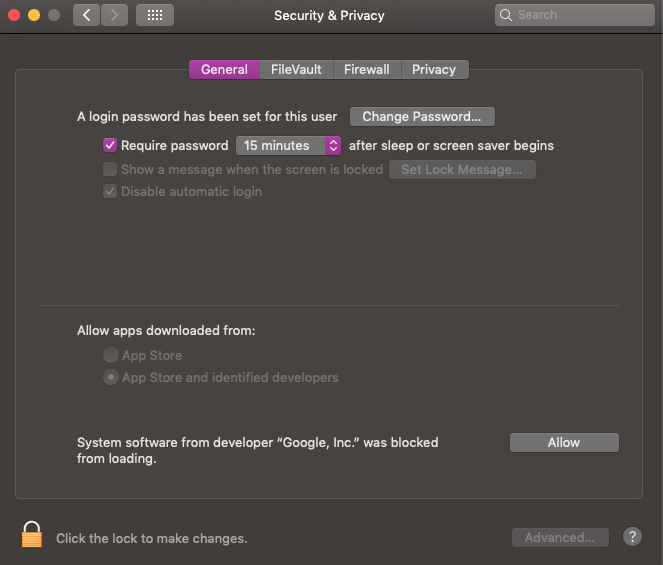
  1. Click Open Security Preferences. (Or, open System Preferences > Security Preferences.)
  2. In the Security and Privacy Menu, click the General tab.  Enable the radio button for “Allow apps downloaded from: App Store and Identified Developers.”


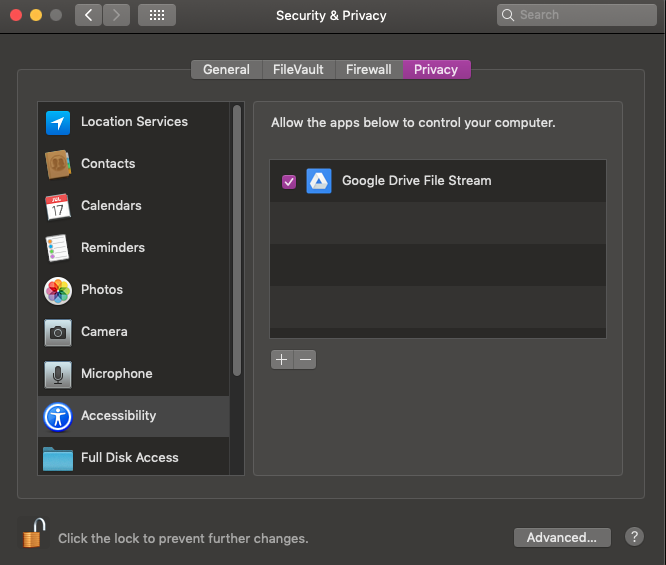
  3. Click the Privacy tab. Verify that Google Drive File Stream is listed under “Allow the apps below to control your computer,” and that the checkbox is enabled.  (You may need to click the padlock to make changes.)


  4. Exit and re-open File Stream. You should not receive the error messages.