Service Disruption

Intermittent Issues Affecting Campus IT Services

Due to recent updates to our campus network infrastructure, members of the Allegheny community may be experiencing intermittent technical issues with some campus services as a result. LITS staff are aware of the issue and are actively working to address it.

If you are experiencing issues, please contact the InfoDesk.

UPDATE 6/6/2019: We believe that the technical issues have been resolved. If you are still experiencing connectivity issues, please contact the InfoDesk at x3768, or open a Web Help Desk ticket.
Google Network Congestion Issue resolved

Google is reporting that the network congestion issue in the eastern USA affecting Google Cloud, G Suite, and YouTube has been resolved for all affected users as of 7:00pm EDT.

Widespread Google Outages

Google is confirming widespread outages across most of its services starting at roughly 3-3:30pm EDT, related to high levels of network congestion in the eastern US.  For more information about the outage, please visit Google’s System Status page here:

https://status.cloud.google.com

or read this summary link on CNet:

https://www.cnet.com/news/google-cloud-issues-take-down-youtube-snapchat-gmail-and-more/

Allegheny’s internet connectivity is functioning normally.

“Schedule Error” emails

Routine maintenance on the Informer report server caused all scheduled reports to run twice.

Informer reports with appropriate and valid data ran successfully. However, they also generated an error message. Reports that would typically have returned zero results without sending an email, instead generated an error email as well.

If anyone on campus received an error message today (May 30, 2019) about an Informer report with the subject “Schedule Error” and the name of a report, these can be safely ignored.

As always, if you have questions, please contact the InfoDesk (x3768).

Google Drive File Stream on Mac OSX

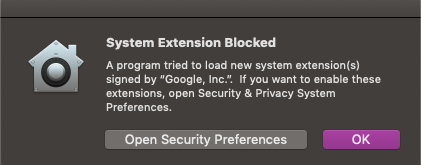
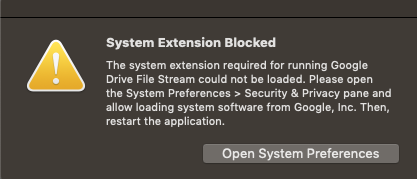
Due to a recent update to Google Drive File Stream, Mac OS users may see the following error messages when trying to open the application:

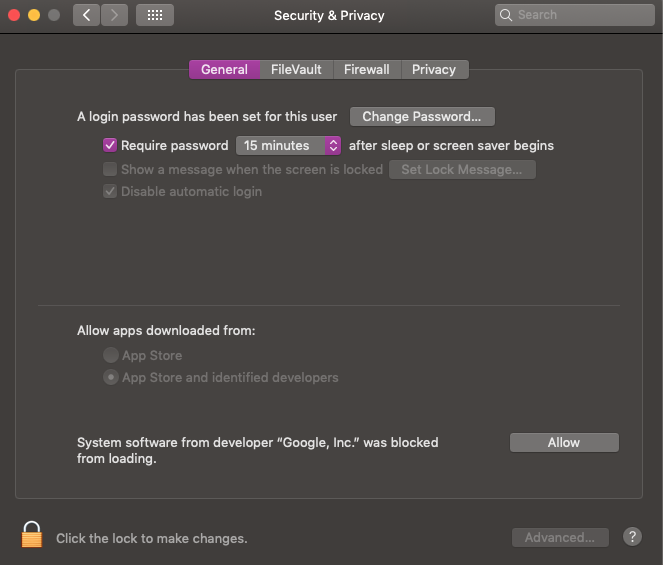
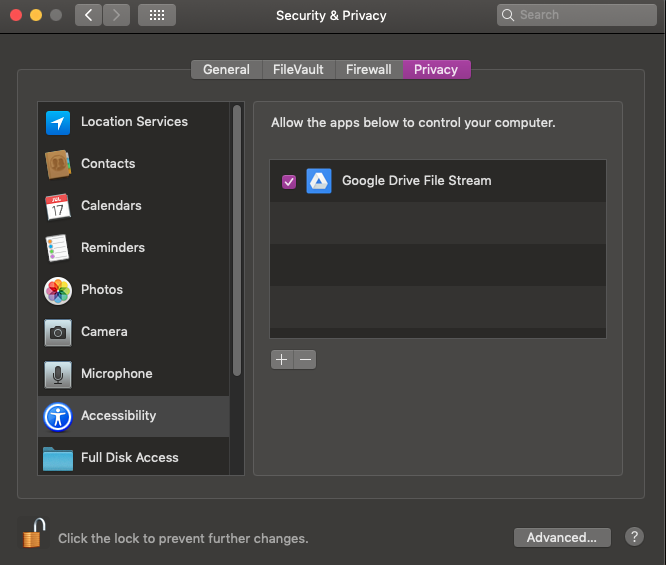
Perform the following steps in order to allow Google Drive File Stream to work properly:

  1. Click Open Security Preferences. (Or, open System Preferences > Security Preferences.)
  2. In the Security and Privacy Menu, click the General tab.  Enable the radio button for “Allow apps downloaded from: App Store and Identified Developers.”


  3. Click the Privacy tab. Verify that Google Drive File Stream is listed under “Allow the apps below to control your computer,” and that the checkbox is enabled.  (You may need to click the padlock to make changes.)


  4. Exit and re-open File Stream. You should not receive the error messages.

Wireless Network Outage in Park Avenue Houses

From approximately noon until 3:00pm Friday afternoon, the wireless network at 570 and 575 Park Avenue was unavailable. The cause of the outage has been resolved and connectivity has been restored.

If you are experiencing any issues related to this outage, please submit a Web Help Desk Ticket.

Re-registering Devices

Due to upcoming changes to the Allegheny wired network, students staying on campus over the summer may need to re-register their devices (such as computers and game systems), to gain network access after Tuesday May 14th.

To request network access for your game system:

  • Log on to https://webhelp.allegheny.edu using your Allegheny username and password.
  • Click on the Request button.
  • Select Student Issue -> Game System Registration -> Wired Connection as the Request type.
  • Provide the requested information. All fields with an asterisk (*) are required.
  • Click Save to send the information.
  • It can take up to a week to have a game system registered on the network.

Please click here for more information on Residence Hall Network Services.

Intermittent outages

It has been brought to the attention of LITS that Allegheny College’s Internet provider will be conducting some emergency upkeep on their network. This could cause intermittent outages and loss of Internet on the campus network between midnight Thursday (3/21) and 2 a.m. Friday (3/22).

We appreciate your understanding and patience during this necessary maintenance.

Service Outage in Tippie

LITS is aware that there is a service disruption to phone and Internet connections in Tippie. We are looking into the issue and will update as we have new information. We appreciate everyone’s patience.

UPDATE: The issue appears to be resolved. We will continue to monitor the situation. Please be sure to create a ticket if you notice any disruption to your Internet or phone service on campus.

Power outage

Friday morning, March 8th, the Meadville area experienced a brief power outage, which affected Allegheny College’s Internet connections and wifi network. We believe that everything is back up and running, but we’re monitoring the situation.

If you’re experiencing any continued or repeated outage, please contact the Pelletier InfoDesk at 814-332-3768 (extension 3768 for internal callers).